If you’re planning custom bunk beds for a Florida vacation rental, beach home, or guest room, the online Bunk Bed Builder from Florida Bunk Beds helps you visualize options before you request a quote. This quick start guide explains each step: uploading a room photo, entering measurements, picking a configuration, and what to do next so your mockup becomes a real custom design.
Step 1 — Start the Bunk Bed Builder and pick a project type
Open the Bunk Bed Builder (the visualizer tool) and choose the project type that best matches your room: freestanding, built-in, triple/quad, or a queen-over-queen layout. Selecting the correct starting template narrows choices—especially important if you’re planning for adult-friendly solutions common in vacation rentals and beach houses.
Step 2 — Upload a clear room photo
Uploading a good photo helps the builder produce a meaningful bunk room mockup. For best results:
- Take a straight-on shot of the wall where the bunk bed will sit, or a wide-angle that shows the full room including ceiling, floor, and relevant walls.
- Avoid heavy backlighting; daytime natural light usually works best for clarity.
- Include visible reference points such as windows, doors, alcoves, baseboards, or an outlet—these help align the visualizer with real features.
The builder accepts photos you upload directly. If you prefer, gather several images from different angles; the more useful visuals you provide, the easier it is to judge scale and placement.
Step 3 — Enter measurements the builder needs
Accurate measurements are essential for a reliable mockup and eventual quote. The builder will prompt you for key dimensions; here’s a concise list to prepare ahead of time:
- Room width and depth (wall-to-wall)
- Ceiling height
- Distance from the intended bed wall to nearby doors, windows, or obstructions
- Window sill height and location if the bed will sit next to or under a window
- Any alcove or closet measurements if the design will be built-in
Note: Florida Bunk Beds uses common bunk geometry for many designs (approximately 87″ wide × 87″ deep × 84″ tall), but every design must be checked against your room dimensions. The builder helps show whether a configuration will fit, given the numbers you provide.
Step 4 — Select mattress sizes and configuration
Choose mattress sizes (twin, full, queen) and the overall configuration: twin-over-queen, queen-over-queen, triple stack, or quad arrangements. If you plan trundles, storage drawers, or stairs, add those options now so the mockup reflects real clearance and circulation.
Think about these trade-offs as you pick options:
- Queen-over-queen increases sleeping comfort for adults but requires more room height and floor footprint.
- Triple and quad bunk systems maximize capacity in a small footprint but may need careful access planning (stairs vs ladder).
- Stair modules and built-in storage create easier access and better guest usability—often preferred for vacation-rental properties.
Step 5 — Place the bed in the photo and review scale
The visualizer places the selected design into your uploaded photo so you can assess visual fit. Use any on-screen scale tools or reference points you supplied to confirm alignment. Look for common issues:
- Headroom for the top bunk relative to ceiling height
- Clearance at doors and windows
- Pathways for guest circulation and luggage
If the mockup looks cramped, try different mattress sizes, move the bed along the wall, or explore built-in configurations that can tuck into alcoves.
Step 6 — Customize finishes and features
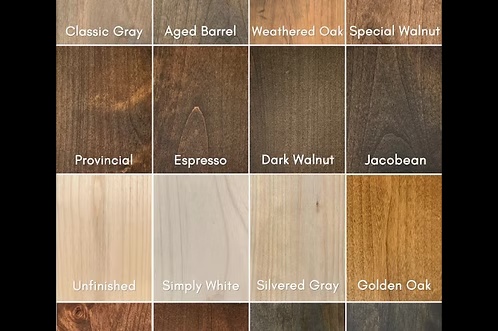
Once the layout and scale are right, select finishes, guardrail styles, stair or ladder options, and storage features. The visualizer shows typical finishes and hardware to help you choose a look that matches a coastal or beach-house aesthetic while keeping heavy-duty construction in mind.
Step 7 — Save your mockup and request a quote
When you’re satisfied with the mockup, save the design and submit it through the builder’s request flow. Attach any additional photos, sketches, or notes about site conditions that would affect installation (narrow halls, stair access for delivery, or special mounting needs for built-ins).
After submission, a Florida Bunk Beds representative will review your mockup and measurements to prepare a custom quote. To move faster or discuss details directly, call or text Andy at 850-361-9988.
What to expect after you submit a design
Expect a follow-up conversation to verify measurements, discuss finishes, clarify delivery and installation availability for your location, and address any site-specific constraints. Because designs are built around your room, final dimensions, options, and installation details are confirmed before production begins.
Helpful tips for vacation-rental and beach-house projects
- Prioritize adult-friendly features—staircases with storage and full-width guardrails improve guest comfort and turnover operations.
- Consider built-in or corner configurations to maximize floor space and circulation in smaller vacation-rental rooms.
- Plan for linens and turnover: integrated drawers or under-bed storage helps keep the room organized between guests.
Resources and next steps
If you want inspiration or to compare common layouts before building your mockup, browse related design pages for ideas: queen-over-queen and queen bunk bed designs, quad bunk beds for high-capacity vacation rentals, or bunk beds with stairs for safer access. When you’re ready, start the Bunk Bed Builder now to upload your photos and measurements.
Call or text Andy at 850-361-9988 to discuss your room, measurements, bunk-bed configuration, and quote.
Relevant links: